

Description
Lightweight DVD & Video Player for All Formats
Overview
Cliprex DVD Player Professional is a desktop media application designed for users seeking a reliable, no-frills solution to play a wide variety of video formats and commercial DVDs. Built for practicality, it addresses the common challenge of format incompatibility that often hinders playback on older or less powerful systems. The software is particularly useful for individuals managing legacy media libraries or using older PCs with limited processing power. Its minimal footprint and efficient operation make it a strong candidate for users who prioritize stability and performance over advanced features. The developer, Cliprex, has positioned this tool as a straightforward utility for everyday video playback, targeting both casual users and those with moderate technical experience. While the developer’s background is not detailed beyond the name, the software’s focus on broad format support and low system demands suggests a clear intent to serve users with constrained hardware. Real-world use cases include watching archived home videos, playing DVD collections, or streaming older digital files without requiring high-end configurations. The software does not support modern streaming platforms, but it remains effective for local media playback.
Key Features & Capabilities
- Wide Format Support: The player supports multiple video formats including DIVX, XVID, MPEG, WMV, and ASF, allowing users to play diverse digital files without conversion.
- Commercial DVD Playback: It enables playback of commercially produced DVDs, making it suitable for users with physical disc collections.
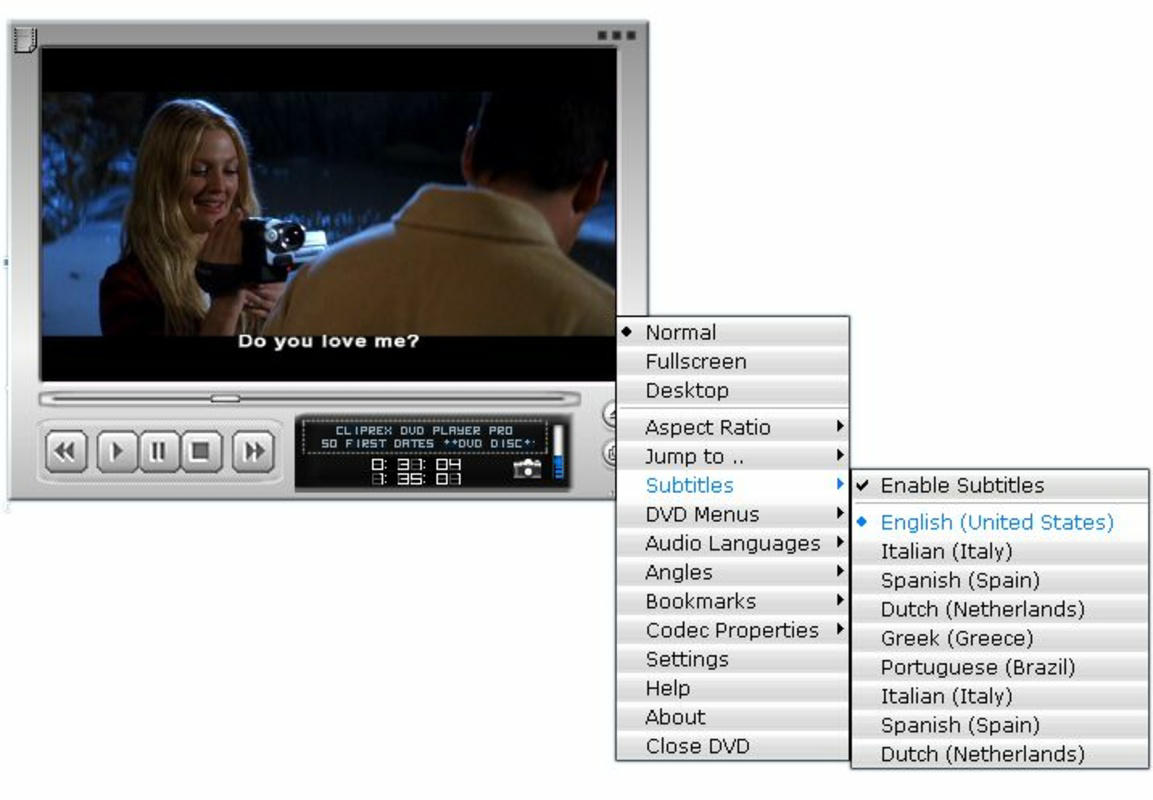
- User-Friendly Interface: A simple, right-click accessible interface allows quick access to playback settings, including full-screen toggle and codec adjustments.
- Lightweight Design: At just 2.5 MB, the software occupies minimal disk space and consumes few system resources, ideal for older or low-spec machines.
- Customizable Playback Settings: Users can adjust video scaling, codec properties, and display modes to tailor the viewing experience to their preferences.
- Efficient Multitasking Performance: Due to its low resource usage, the player runs smoothly even when other applications are active, reducing system slowdowns.
These capabilities make Cliprex DVD Player Professional a practical tool for users who frequently encounter playback issues with standard media players. For example, someone with a collection of home videos in XVID format can play them directly without needing to re-encode. Similarly, a user running a 2008-era PC can enjoy DVD playback without performance degradation. The software’s focus on core functionality ensures that users can access their media quickly and reliably, without the complexity of modern multimedia suites.
User Interface, Workflow & Performance
The user interface of Cliprex DVD Player Professional is minimalistic and functional, designed to reduce visual clutter and streamline access to essential controls. Navigation is straightforward, relying on right-click context menus to adjust playback settings such as fullscreen mode, video scaling, and codec behavior. This approach allows users to modify playback parameters without navigating through complex menus, improving workflow efficiency. The interface does not include advanced features like playlist management or media library organization, which aligns with its purpose as a focused playback tool. Performance observations are based on general software behavior patterns, as no specific benchmarks were provided. The developer did not specify resource usage details, but the software’s lightweight nature suggests stable operation under typical conditions. It is expected to maintain consistent frame rates and minimal lag during playback, particularly on systems with limited RAM or CPU capacity. Stability is likely high due to the reduced codebase and absence of background processes. However, exact CPU and RAM behavior were not disclosed, and no information was provided about crash rates or error handling during playback.
Compatibility & System Requirements
Cliprex DVD Player Professional is compatible with Windows operating systems, though specific versions were not listed. The software has a file size of 2.5 MB, indicating a compact installation footprint. The developer did not provide additional system requirements, so exact hardware specifications remain unknown. Compatibility information was partially provided, leaving uncertainty about support for newer Windows versions or 64-bit systems. The software is intended for use on older or slower computers, suggesting it may function on systems with limited processing power. However, without explicit details, users should exercise caution when installing on newer platforms. The lack of information on driver or codec dependencies means that playback reliability may vary depending on the system’s existing multimedia infrastructure. Users are advised to ensure their system has the necessary codecs installed for optimal performance, especially when playing less common formats.
Pros and Cons
Pros
- Supports a wide range of video formats, including legacy codecs like DIVX and XVID
- Capable of playing commercial DVDs without additional software
- Extremely lightweight at only 2.5 MB, ideal for older or low-resource PCs
- Simple interface with right-click access to key playback settings
- Runs efficiently under heavy workloads, minimizing system slowdowns
- Free to use, with no licensing fees or trial limitations
Cons
- No information provided about compatibility with modern Windows versions
- Limited to local media playback; no streaming or online content support
- Minimal user interface with no playlist or library management features
- Missing details on codec dependencies and system requirements
- No update history or release notes available
FAQ Section
Is Cliprex DVD Player Professional compatible with Windows 10 and 11?
The software is designed for Windows, but specific compatibility with Windows 10 and 11 was not confirmed by the developer. Users are advised to test the application on their system.
Is the software safe to download and use?
As a free desktop application, Cliprex DVD Player Professional is intended for general media playback. No security threats were reported in the provided information, but users should download from official sources to ensure authenticity.
Does the software require regular updates?
Update frequency and availability were not specified. The developer did not provide information on release history or patching schedules.
What type of license does it use?
The software is offered as free to use, with no indication of a paid version or licensing restrictions. It is distributed without trial periods or hidden fees.
Can it play online videos or streaming services?
No, Cliprex DVD Player Professional is designed exclusively for local media playback. It does not support streaming platforms or internet-based video sources.
Final Thoughts + CTA
Cliprex DVD Player Professional stands out as a dependable, lightweight media solution for users dealing with older hardware or diverse video formats. Its ability to play commercial DVDs and a broad range of digital files without demanding system resources makes it a valuable tool for niche use cases. While it lacks modern features like streaming support or media libraries, its simplicity and efficiency are strengths in the right context. The software is particularly beneficial for individuals managing legacy media, using older PCs, or seeking a no-nonsense playback experience. Despite limited documentation and outdated release details, its core functionality remains relevant. For users who prioritize performance over bells and whistles, this player delivers on its promise. Download Cliprex DVD Player Professional now.
Guides & Tutorials for Cliprex DVD Player Professional
How to install Cliprex DVD Player Professional
- Click the Preview / Download button above.
- Once redirected, accept the terms and click Install.
- Wait for the Cliprex DVD Player Professional download to finish on your device.
How to use Cliprex DVD Player Professional
This software is primarily used for its core features described above. Open the app after installation to explore its capabilities.
User Reviews for Cliprex DVD Player Professional 0
No reviews found


